
Executive summary
This paper defines a controlled same-tenant migration pattern for copying the contents of a retired Exchange Online mailbox into a separately provisioned active mailbox. The recommended design uses the old mailbox only after Exchange Online reports it as soft-deleted or inactive, preserves its identity evidence, reassigns approved SMTP aliases to the new mailbox, adds the old LegacyExchangeDN as an X500 proxy address, and then uses the Mailbox Replication Service through New-MailboxRestoreRequest to copy content.
The operation is a content restore, not an identity merge. It does not by itself migrate the old Microsoft Entra identity, OneDrive, Teams data, licenses, group membership, mailbox-level permissions, delegates, mobile partnerships, or client configuration. Those dependencies require separate workstreams or acceptance decisions.
What this paper corrects
Deletion is a gated cutover action, not a routine first step. The exact operation depends on whether the object is cloud-only or synchronized from on-premises.
A 30-day soft-deleted state is a recovery window, not a backup strategy. The source must be positively verified before any restore begins.
The X500 address is the durable LegacyExchangeDN compatibility mechanism. Microsoft documents that AllowLegacyDNMismatch is being deprecated in the cloud; the design therefore adds X500 and does not rely on the switch.
Archive restore is expressed with -SourceIsArchive and -TargetIsArchive. It is not modeled as a primary-mailbox restore that merely substitutes archive GUIDs.
A hold changes the lifecycle to an inactive mailbox and may extend preservation. It is a compliance input, not an error condition to bypass.
1. Context and objectives
The initiating support discussion proposed retiring an old account, allowing its Exchange Online mailbox to become recoverable, assigning the former email address and LegacyExchangeDN to a new mailbox, and restoring primary and archive content. That intent is valid for a narrow scenario: two different mailboxes in the same Microsoft 365 tenant where the business wants the new mailbox to receive the old address and historical content.
Objectives
Preserve historical messages, calendar items, contacts, and folder content from the old mailbox by copying them into the new mailbox.
Redirect new mail sent to the approved old SMTP addresses to the new mailbox with the shortest practical routing interruption.
Preserve reply compatibility for messages and cached recipients that reference the old LegacyExchangeDN.
Maintain legal, retention, security, and identity-governance controls throughout the change.
Provide deterministic checkpoints, rollback choices, and evidence suitable for a change record.
2. Scope, assumptions, and non-goals
| Dimension | In scope | Boundary / assumption |
|---|---|---|
| Tenant | Exchange Online mailbox-to-mailbox content restore | Source and target are in the same tenant; this is not cross-tenant migration. |
| Source | Soft-deleted mailbox within its recoverable window, or inactive mailbox preserved by hold | Source ExchangeGuid and LegacyExchangeDN were captured and can be uniquely resolved. |
| Target | Existing, licensed, healthy Exchange Online mailbox | Target has capacity; archive is enabled before archive restore if required. |
| Identity | Address cutover and source retirement coordination | Identity objects are not merged. The new user remains the security principal. |
| Content | Primary mailbox; archive as a separate request | Restore copies content. Non-mailbox Microsoft 365 workloads are excluded. |
| Administration | Exchange Online PowerShell plus the authoritative directory toolset | Hybrid recipient attributes are changed on-premises and synchronized. |
Key assumptions to confirm
The old identity is approved for retirement; otherwise use a coexistence or export/import pattern instead of deleting it.
The target mailbox is not the same mailbox reattached to a new sign-in. If the goal is identity recovery, restore the deleted user/mailbox from the same system where it was deleted.
The target mailbox can absorb the source primary and archive data without breaching mailbox, recoverable-items, or archive limits.
The source is not an inactive mailbox with an auto-expanding archive; Microsoft states that this scenario cannot be recovered or restored using the normal inactive-mailbox workflow.
Business owners accept either a folder merge or an isolated TargetRootFolder. This paper recommends an isolated root for controllability unless seamless folder merging is an explicit requirement.
3. Target architecture
The design separates three concerns: identity and address authority, the mailbox data plane, and governance evidence. This separation prevents a directory synchronization decision from being mistaken for a mailbox-copy operation.
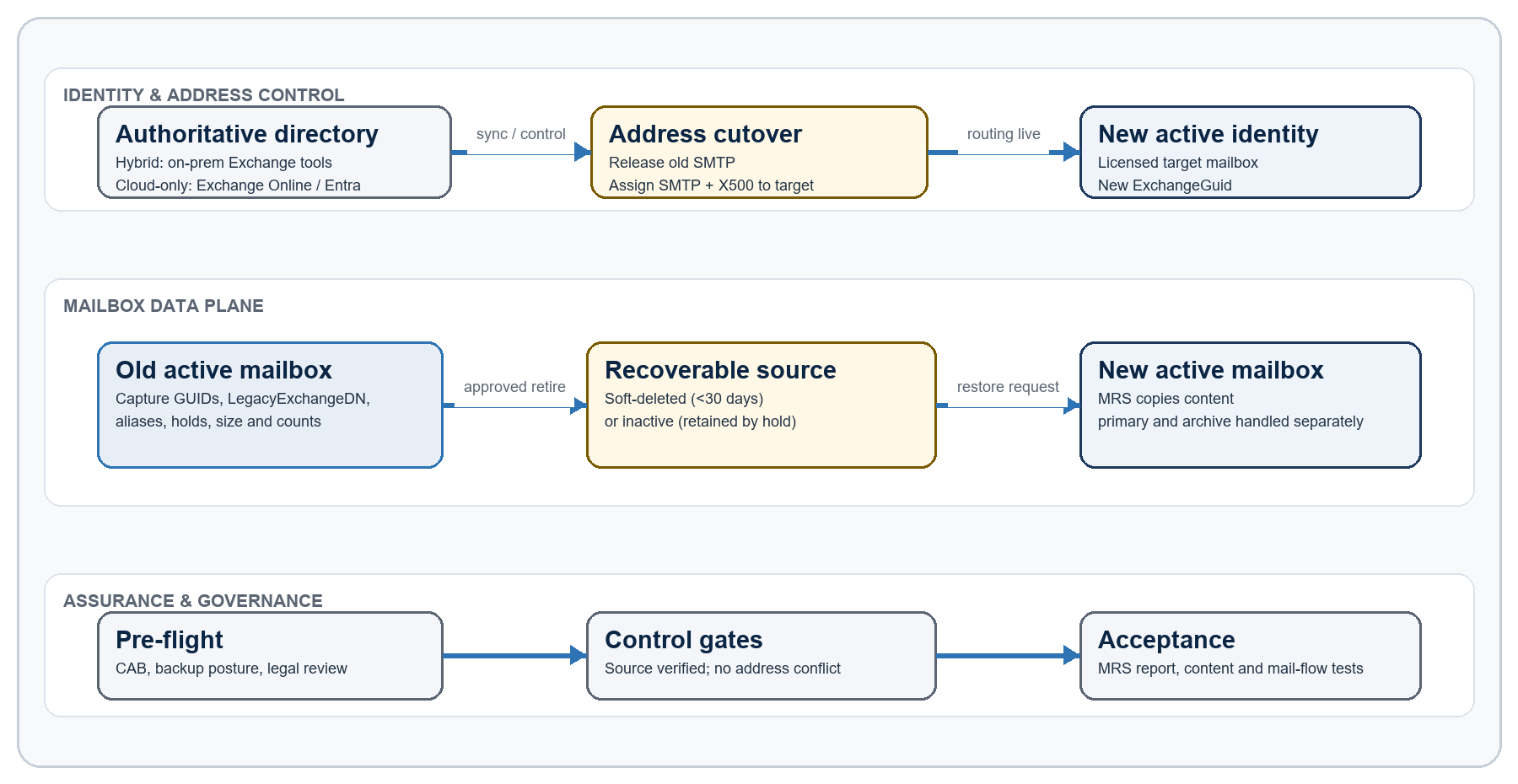
Architecture components
| Component | Responsibility | Key evidence |
|---|---|---|
| Authoritative directory | Owns the user object and synchronized Exchange attributes | Cloud-only vs hybrid classification; change transcript; sync result |
| Old mailbox | Supplies preserved content after it becomes soft-deleted or inactive | ExchangeGuid, ArchiveGuid, LegacyExchangeDN, aliases, holds, size, item counts |
| New mailbox | Receives mail routing and restored content | Target ExchangeGuid, provisioned archive, quota headroom, assigned aliases and X500 |
| Mailbox Replication Service | Executes asynchronous primary/archive restore requests | Request identity, status, report, item and byte counts, failures/skips |
| Change governance | Authorizes deletion, cutover, validation, and rollback | CAB approval, legal decision, test record, owner acceptance |
4. Decision logic and supported pathways
| Question | If yes | If no |
|---|---|---|
| Is the recipient synchronized from on-premises? | Make address and recipient-state changes with supported on-premises Exchange management tools, then synchronize. | Use Exchange Online / Microsoft Entra administration as the source of authority. |
| Must the old identity remain active? | Stop. This deletion-based pattern is not appropriate; design coexistence or content export/import. | Proceed after retirement approval and dependency checks. |
| Is any legal or retention hold applicable? | Preserve it. Expect an inactive mailbox and use the inactive-source workflow. | Use the normal soft-deleted workflow and finish inside the recoverable window. |
| Is the source visible by ExchangeGuid? | Continue only after all recorded properties match the intended user. | Stop; do not substitute an SMTP-only match or another mailbox. |
| Is an archive present? | Enable and size the target archive; run a separate archive restore request. | Run the primary restore only. |
| Does the business require native-folder merge? | Omit TargetRootFolder and accept collision/duplicate complexity. | Use an isolated root folder for clearer verification and rollback. |
Supported source states
Soft-deleted source. Exchange Online retains a deleted user mailbox for a limited recovery period, normally 30 days. The change team must treat the observed deletion timestamp—not a planned date—as the operational clock and complete the restore with contingency time remaining.
Inactive source. A mailbox placed on an applicable hold before deletion can remain as an inactive mailbox. Restoring copies content to the target while preserving the inactive source. Compliance ownership and target retention requirements remain in force.
Hard-deleted or unresolvable source. The design stops. New-MailboxRestoreRequest cannot reconstruct a permanently purged source. Escalate to backup, eDiscovery, or Microsoft Support options only if they are independently available and authorized.
5. Governance and safety controls
Required approvals
Change approval for source retirement, mail-address cutover, and the expected user-impact window.
Business-owner confirmation that the target mailbox is the correct legal and operational recipient of the old content.
Records-management or legal approval whenever Litigation Hold, eDiscovery hold, Microsoft 365 retention, delay hold, or another preservation control is present.
Identity-owner confirmation of the correct source-of-authority path and any downstream HR, application, SSO, or service-account dependencies.
Security confirmation that adding old addresses and historical content to the target does not expand access beyond policy.
Go / no-go gates
| Gate | Go evidence | No-go condition |
|---|---|---|
| G1 - Identity | Old and new objects uniquely mapped; target owner approved | Ambiguous SMTP-only match; target identity disputed |
| G2 - Preservation | Hold status reviewed; source metadata exported | Unknown legal status; instruction to remove hold without owner approval |
| G3 - Capacity | Target primary/archive capacity and licensing validated | Insufficient quota or unprovisioned archive |
| G4 - Routing | Old address released in authoritative directory; no conflicting recipient | Duplicate proxy address or incomplete sync |
| G5 - Recoverability | Correct soft-deleted/inactive mailbox visible by GUID | Source absent, permanently deleted, or mismatched |
| G6 - Execution | Unique request names; monitoring and rollback owners online | No coverage during cutover or restore window |
6. End-to-end migration runbook
- 0Plan & freezeG1–G3
- 1Capture evidence
- 2Address ownershipG4
- 3Retire old identity
- 4Verify source stateG5
- 5Routing + X500
- 6Primary restoreG6
- 7Archive restore
- 8Validate & close
Phase 0 - Plan and freeze
Open the change record with scope, old/new identities, maintenance window, owners, validation plan, communications, and rollback decision points.
Freeze address, license, hold, retention, delegate, and archive changes for both mailboxes until acceptance.
Confirm whether the old mailbox has an auto-expanding archive, whether the target archive is enabled, and whether any application sends as the old identity.
Phase 1 - Capture source and target evidence
Capture old ExchangeGuid, ArchiveGuid, LegacyExchangeDN, primary SMTP address, proxy addresses, recipient type, archive status, hold indicators, mailbox sizes, item counts, and relevant permissions.
Capture the target equivalents and confirm it is healthy, licensed, accessible, and has enough capacity.
Export the results to the secured change record. Do not rely on a notepad-only copy or SMTP address as the source identifier.
Phase 2 - Prepare address ownership
Decide whether the former primary SMTP address will become a secondary alias on the target or the target's new primary/reply address. Lowercase smtp denotes a proxy alias; uppercase SMTP denotes the primary address in proxyAddresses representations.
If the old address must be released before source deletion, first assign the old object a unique parking primary address, then remove the former SMTP proxy from the authoritative directory.
In hybrid, use supported on-premises Exchange recipient-management commands and allow synchronization to complete. Do not make a cloud-only change that Entra Connect will overwrite.
Phase 3 - Retire the old identity through the approved authority
Cloud-only: use the approved Microsoft 365 / Entra deletion workflow, or the explicitly approved Exchange Online removal path. Do not perform both.
Hybrid: retire the on-premises object or remote mailbox using the organization's supported Exchange/identity process, then synchronize. Do not follow an on-premises deletion with an unreviewed cloud Remove-Mailbox command.
If the old account must remain, stop and redesign. Disable-RemoteMailbox is not a drop-in substitute and has licensing and archive sequencing requirements.
Phase 4 - Verify the source state
Query Exchange Online using the recorded ExchangeGuid. Confirm exactly one source appears as soft-deleted or inactive and that its LegacyExchangeDN and expected metadata match.
Record the observed deletion/inactive timestamp and calculate the working deadline. Escalate immediately if the source cannot be found.
Do not proceed based only on Get-MailboxStatistics output or a reused SMTP address; the mailbox object and state must be explicit.
Phase 5 - Activate routing compatibility on the target
Verify the old SMTP address is no longer assigned to any active recipient, group, contact, mail-enabled public folder, or conflicting directory object.
Add the approved old SMTP aliases to the target through the correct source of authority.
Add X500:<old LegacyExchangeDN> to the target. Retain it after migration unless a documented reason requires removal; it prevents IMCEAEX/non-delivery failures for old cached recipients and replies.
Allow synchronization and Exchange propagation to complete; then test inbound mail to the old address before starting the content restore.
Phase 6 - Restore primary mailbox content
Create a uniquely named New-MailboxRestoreRequest using the source ExchangeGuid (or inactive-mailbox distinguished name) and the active target identity/GUID.
Use TargetRootFolder for an isolated, auditable copy unless the business explicitly chooses a folder merge.
Monitor the request through completion, preserving the detailed report and any skipped-item or failure information.
Phase 7 - Restore archive content if required
Confirm the target archive is active and sized. Run a separate restore request with -SourceIsArchive and -TargetIsArchive.
Use a TargetRootFolder for archive restores, particularly when mapping primary content into an archive, so restored content remains visible and identifiable.
Stop and redesign if the documented inactive auto-expanding archive limitation applies.
Phase 8 - Validate, accept, and close
Complete technical content, routing, X500, archive, permission, and client-access tests; compare source baselines with target deltas.
Obtain business and compliance acceptance, export request reports, and attach evidence to the change record.
Remove completed restore-request objects only after evidence has been retained. Removing a request record does not undo copied content.
End the freeze and transfer any outstanding non-mailbox work to named owners.
7. PowerShell reference implementation
7.1 Connect and declare change-scoped variables
Connect-ExchangeOnline


$OldId = "[email protected]"

$NewId = "[email protected]"

$ChangeId = "CHG000000"

$OldPrimary = "[email protected]"

$PrimaryRequest = "OldToNew-Primary-$ChangeId"

$ArchiveRequest = "OldToNew-Archive-$ChangeId"7.2 Capture immutable mailbox identifiers and baselines
$old = Get-Mailbox -Identity $OldId -ErrorAction Stop

$new = Get-Mailbox -Identity $NewId -ErrorAction Stop


$old | Format-List DisplayName,PrimarySmtpAddress,ExchangeGuid,ArchiveGuid,

LegacyExchangeDN,ArchiveStatus,RecipientTypeDetails,LitigationHoldEnabled,

InPlaceHolds,RetentionHoldEnabled,DelayHoldApplied,DelayReleaseHoldApplied

$old.EmailAddresses | Sort-Object


Get-MailboxStatistics -Identity $OldId |

Format-List ItemCount,TotalItemSize,TotalDeletedItemSize,LastLogonTime


if ($old.ArchiveStatus -eq "Active") {

Get-MailboxStatistics -Identity $OldId -Archive |

Format-List ItemCount,TotalItemSize,TotalDeletedItemSize

}


$new | Format-List DisplayName,PrimarySmtpAddress,ExchangeGuid,ArchiveGuid,

LegacyExchangeDN,ArchiveStatus,RecipientTypeDetailsHybrid note. Capture the corresponding on-premises remote-mailbox object as well. Use Set-RemoteMailbox (or the organization's supported Exchange recipient-management tooling) for synchronized email-address changes; use Set-Mailbox only for cloud-managed recipients.
7.3 Locate and positively identify the recoverable source
$OldExchangeGuid = $old.ExchangeGuid # Persist this value before deletion.


$source = Get-Mailbox -SoftDeletedMailbox -Identity $OldExchangeGuid `

-ErrorAction SilentlyContinue


if (-not $source) {

$source = Get-Mailbox -InactiveMailboxOnly -Identity $OldExchangeGuid `

-ErrorAction Stop

}


$source | Format-List Name,DistinguishedName,ExchangeGuid,ArchiveGuid,

LegacyExchangeDN,PrimarySmtpAddress,ArchiveStatus,IsInactiveMailbox7.4 Add old routing identities to a cloud-managed target
$OldLegacyDn = $source.LegacyExchangeDN


# Use lowercase smtp when the old address should remain a secondary alias.

Set-Mailbox -Identity $NewId -EmailAddresses @{

Add = "smtp:$OldPrimary", "X500:$OldLegacyDn"

}


# If the former address must become the target's default reply address:

# Set-Mailbox -Identity $NewId -PrimarySmtpAddress $OldPrimaryFor a synchronized target, execute the equivalent address changes with Set-RemoteMailbox on-premises, synchronize, and verify the result in Exchange Online. An SMTP proxy can be assigned to only one recipient at a time.
7.5 Submit the primary restore (recommended isolated-root pattern)
$TargetGuid = (Get-Mailbox -Identity $NewId -ErrorAction Stop).ExchangeGuid

$TargetRoot = "Former Mailbox - $OldId"


New-MailboxRestoreRequest -Name $PrimaryRequest `

-SourceMailbox $source.ExchangeGuid `

-TargetMailbox $TargetGuid `

-TargetRootFolder $TargetRootFor an inactive mailbox, Microsoft also documents using the source DistinguishedName. Because the X500 proxy is added to the target, the design does not rely on -AllowLegacyDNMismatch. Omit TargetRootFolder only when a native-folder merge is the approved behavior.
7.6 Submit a separate archive restore
if ($source.ArchiveStatus -eq "Active") {

New-MailboxRestoreRequest -Name $ArchiveRequest `

-SourceMailbox $source.ExchangeGuid -SourceIsArchive `

-TargetMailbox $TargetGuid -TargetIsArchive `

-TargetRootFolder "Former Mailbox Archive - $OldId"

}7.7 Monitor and preserve the detailed request report
Get-MailboxRestoreRequest -Name $PrimaryRequest |

Get-MailboxRestoreRequestStatistics -IncludeReport |

Format-List Status,StatusDetail,PercentComplete,ItemsTransferred,

BytesTransferred,FailureType,Message


Get-MailboxRestoreRequest -Name $ArchiveRequest |

Get-MailboxRestoreRequestStatistics -IncludeReport |

Format-List Status,StatusDetail,PercentComplete,ItemsTransferred,

BytesTransferred,FailureType,Message8. Validation and acceptance
Technical validation checklist
Request status is Completed or otherwise explicitly accepted after review; PercentComplete is 100 and the detailed report has been retained.
ItemsTransferred and BytesTransferred are plausible against the recorded source baseline; any skip, warning, or failure is classified and accepted.
The restored root/folder hierarchy is visible in Outlook on the web and at least one supported Outlook client.
Representative email, calendar, contact, task, attachment, and custom-folder samples open successfully across early, middle, and recent date ranges.
If archive was included, the target archive is accessible and restored content is visible under the planned root.
Search indexing delay is recorded separately from restore completeness; user acceptance should not treat immediate search behavior as the only evidence.
Mail-flow and compatibility checklist
Inbound mail to the target's original primary address succeeds.
Inbound mail to each approved old SMTP alias succeeds.
Outbound messages use the agreed primary/reply address.
Replying to a historical message and selecting an old cached recipient does not generate an IMCEAEX NDR; the X500 proxy remains present.
Autodiscover, Outlook on the web, mobile, and shared/delegated access work as separately designed.
Connectors, transport rules, applications, scanners, CRM systems, and journaling dependencies referencing the old address were tested or reassigned.
Acceptance evidence
| Artifact | Owner | Acceptance standard |
|---|---|---|
| Pre-change export | Exchange administrator | GUIDs, LegacyExchangeDN, aliases, holds, sizes/counts attached to change |
| Directory transcript | Identity administrator | Authoritative changes and successful synchronization evidenced |
| Restore reports | Exchange administrator | Primary and archive status/reports stored; issues dispositioned |
| Mail-flow tests | Messaging operations | Old and new addresses deliver; reply/X500 test passes |
| Business UAT | Mailbox owner / sponsor | Representative content and folder access accepted |
| Compliance sign-off | Records / legal | Source and target retention/hold outcomes acknowledged |
9. Rollback and recovery
Rollback is stage-dependent. A mailbox restore is an asynchronous copy, not a transaction. If content was merged into native folders, separating it later may be difficult; this is the strongest reason to prefer TargetRootFolder for the initial restore.
| Stage | Rollback action | Constraint |
|---|---|---|
| Before source retirement | Reverse parking-address changes; cancel the change; resume normal operations. | No mailbox data copy has occurred. |
| After retirement, before target cutover | Restore the identity/mailbox from the same authority from which it was deleted, if still recoverable. | Must respect the recovery window and hybrid source of authority. |
| After address cutover, before restore | Return routing only after releasing the address from the target and completing directory propagation. | Expect propagation delay and possible mail-flow interruption. |
| Restore in progress | Suspend or remove the restore request only after technical assessment; preserve reports. | Already copied items remain in the target. |
| After isolated-root restore | Retain or remove the isolated root only under approved data-handling instructions. | Deletion may conflict with retention/hold obligations. |
| After native-folder merge | Use targeted remediation or a clean target built from baseline if feasible. | There is no reliable one-click unmerge. |
10. Risks, operating model, and recommendations
Principal risks and mitigations
| Risk | Impact | Mitigation |
|---|---|---|
| Wrong mailbox selected | Disclosure or contamination of another user's mailbox | Use GUID and LegacyExchangeDN evidence; require peer review and target-owner approval. |
| Source hard-deleted | Irrecoverable mailbox loss | No PermanentlyDelete; verify source state immediately; complete inside the working window. |
| Hybrid writeback conflict | Attributes revert or provisioning fails | Change synchronized recipients on-premises; wait for verified sync before proceeding. |
| Duplicate proxy address | Target alias assignment fails; mail may route incorrectly | Search all recipient types; release the address at the source of authority; recheck after propagation. |
| Hold mishandled | Legal/compliance breach or unintended purge | Preserve holds; involve records/legal; use inactive-mailbox path. |
| Insufficient capacity | Restore fails or target service is constrained | Baseline sizes; confirm license, quota, archive status, and recoverable-items headroom. |
| Folder collision / duplicates | Confusing user experience; difficult rollback | Prefer isolated TargetRootFolder; document merge acceptance when omitted. |
| Archive limitation | Archive data cannot be restored by standard path | Identify auto-expanding inactive archives early; design an approved alternate process. |
| Non-mailbox dependencies missed | Access, workflow, or application outage | Use dependency inventory; assign OneDrive, Teams, groups, delegates, apps, and devices to separate tasks. |
RACI
| Activity | Responsible | Accountable | Consulted / informed |
|---|---|---|---|
| Architecture and change design | Exchange architect | Service owner | Identity, security, compliance, support |
| Source/target evidence | Exchange administrator | Exchange architect | Business owner |
| Identity retirement and sync | Identity administrator | Identity service owner | Exchange administrator, HR/app owners |
| Hold/retention decision | Records or legal team | Compliance owner | Exchange architect, business owner |
| Restore execution | Exchange administrator | Messaging service owner | Support desk |
| UAT and acceptance | Mailbox owner / sponsor | Business owner | Exchange administrator, support |
Architect recommendations
Pilot with non-critical mailboxes that represent both primary-only and primary-plus-archive cases. Capture real restore duration, propagation time, and validation effort.
Standardize a pre-change evidence export and a GUID-based mapping sheet; never use display name or SMTP alone as the migration key.
Default to an isolated TargetRootFolder for the first production wave. Move to native-folder merge only after business testing establishes that collision behavior is acceptable.
Keep X500 aliases after migration. Treat them as compatibility data, not temporary clutter.
Automate read-only discovery and validation first. Keep identity deletion and purge decisions manual, peer-reviewed, and change-controlled.
Review Microsoft documentation and tenant behavior again before production execution; Exchange Online service behavior and cmdlet support can change.
Appendix A - Interpretation of the original command sequence
| Original idea | Architected interpretation |
|---|---|
| Get GUID, ArchiveGuid, LegacyExchangeDN, and aliases | Correct and expanded: also capture holds, recipient type, sizes, item counts, target capacity, and authoritative-directory state. |
| Remove SMTP from old mailbox | Correct intent, but first decide primary vs alias, use a parking address if required, and update the authoritative directory. Verify uniqueness after sync. |
| Delete on-prem AD account, then Remove-Mailbox | Do not stack deletion methods. Choose one approved cloud-only or hybrid lifecycle path and verify the resulting mailbox state. |
| Confirm Get-Mailbox -SoftDeletedMailbox | Correct, but identify by ExchangeGuid. If hold applies, query -InactiveMailboxOnly instead. |
| Add old SMTP and X500 to new mailbox | Correct. Use lowercase smtp for a secondary alias, set PrimarySmtpAddress explicitly when needed, and add X500:<old LegacyExchangeDN>. |
| Use -AllowLegacyDNMismatch | Do not rely on it. Microsoft notes cloud deprecation; add the source LegacyExchangeDN as X500 and perform the normal safety match. |
| Restore old archive GUID to new archive GUID | Use the mailbox source/target plus -SourceIsArchive and -TargetIsArchive. Confirm target archive and source limitations first. |
| Make sure Litigation Hold is not applied | Incorrect as a blanket rule. Preserve and govern holds; a held deleted mailbox may become inactive and can follow the inactive restore path. |
Appendix B - Microsoft references
The design was validated against the following Microsoft Learn documentation on 3 September 2026. Tenant behavior, licensing, and cmdlet support must be rechecked at implementation time.
Delete or restore user mailboxes in Exchange Online — Soft-deleted lifecycle, 30-day recovery behavior, hybrid restore outline, and deletion cautions.
Restore an inactive mailbox — Inactive-source identity, X500 prerequisite, primary/archive restore syntax, TargetRootFolder, and auto-expanding archive limitation.
New-MailboxRestoreRequest — Cmdlet syntax, source/target semantics, archive switches, and legacy-DN behavior.
Remove-RemoteMailbox — Hybrid on-premises command scope, directory synchronization dependency, and remote mailbox lifecycle.
Disable-RemoteMailbox — Keep-user scenario, license prerequisite, archive sequencing, and synchronized removal behavior.
Proxy address conflict when adding an email address in Exchange Online — One-recipient address uniqueness and conflict-discovery guidance.
Get-MailboxRestoreRequestStatistics — Detailed restore-request monitoring and report retrieval.